Top 10 AI Tools for Students Studying Computer Science Engineering

Blog / September 10, 2026
Think about being handed a semester project and having to work out everything from scratch. The traditional approach was straightforward: find your sources, open your code editor, and work through the problems yourself. AI has changed that workflow. Today, a growing number of AI tools for students can make different parts of the process easier.
And students are already using them. Demanzo's Future AI Workforce Report 2026, a survey of engineering and IT students at colleges across India, found that 88% already use AI tools daily or several times a week, and 96% turn to AI to learn new concepts before using it for assignments, coding, or research.
So, what does that actually look like for a CSE student working on a project? This blog follows a project-based approach from the first idea to final submission, and shows exactly which tools help at each step, and which parts you still have to do yourself.
How Is AI Useful for a CSE Student?
AI is useful for a CSE student because it speeds up the parts of the workload that used to eat the most time like-
- Debugging Code
- Understanding dense theory like Discrete Mathematics or Operating Systems
- Managing research for a project
- Staying organized across a tough semester
Used well, it works like a patient teaching assistant who's available at 2 a.m. before a deadline, not a replacement for the thinking you still need to do yourself.
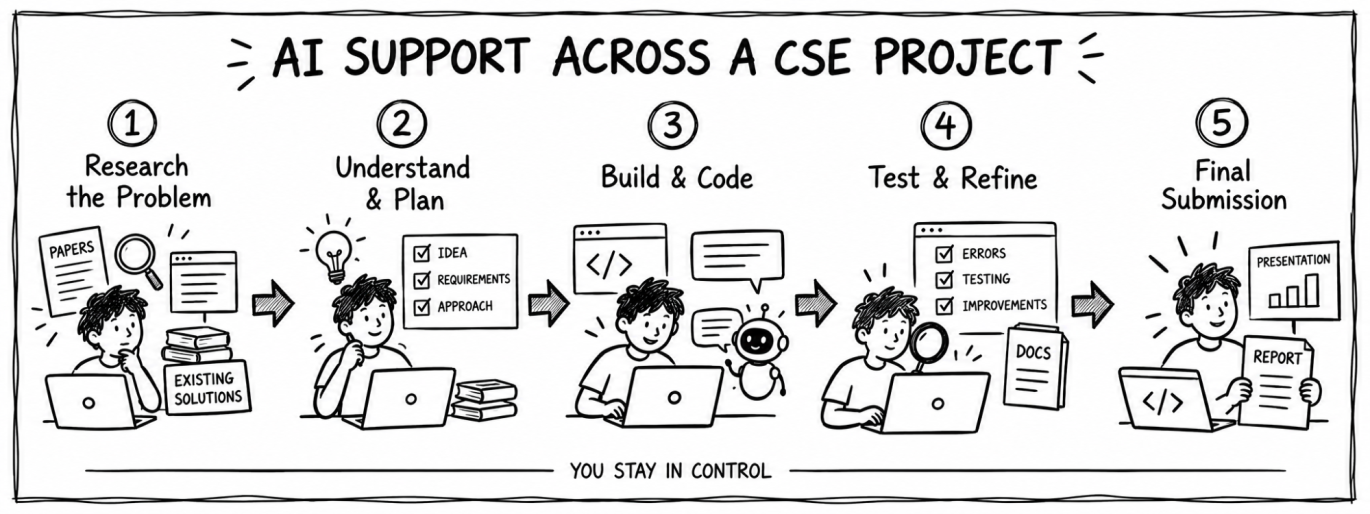
How AI Tools for Students Fit Into a CSE Project
The usefulness of AI becomes clearer when you look at how a project actually comes together. From deciding what to build and researching the problem to writing, debugging, and refining the final submission, different tools can help at different stages. Here’s how you should begin-
Stage 1: Picking a Direction and Researching the Problem
Before you write a single line of code, you need to know what's already been done and whether your idea actually holds up. This is where most projects either get a strong foundation or start off shaky.
Tool | What It Does | Where It Fits In Your Project |
| Answers questions with sources cited directly next to the answer, pulling from academic papers and technical documentation. | Scoping a project for an elective like Machine Learning, where you need to check whether your idea has already been done, and see the source for yourself. |
| Builds answers only from documents you upload, summarizes long papers and lecture notes, and compares multiple sources side by side. | Turning the papers or lecture material a project is based on into something you can question directly, instead of rereading everything from scratch. |


The two tools split the research job in a useful way: Perplexity is for finding what's out there, and NotebookLM is for making sense of what you've already found. Used together, they turn the vague first week of a project, where you're not sure your idea is even worth building, into something you can actually verify before you commit time to it.
Stage 2: Refreshing the Concepts You Actually Need
Once you know what you're building, there's usually a concept or two you half-remember from class and now need cold. This is the stage where a lot of projects stall out.
Tool | What It Does | Where It Fits In Your Project |
| Explains a concept at different levels of difficulty, walks through problems step by step, and generates practice questions to check understanding. | Breaking down Big-O analysis, recursion, or a tricky Discrete Mathematics idea right when a project needs it. |
| Solves equations step by step rather than just giving the final answer, and generates graphs and statistical visualizations. | The heavier math in Discrete Mathematics, Probability and Statistics, or Design and Analysis of Algorithms, where a real computed answer matters more than a guess. |


ChatGPT is better for the conceptual gap, the moment you need something explained in plain language before it clicks. WolframAlpha is better once you're past that and need the actual computation checked, since a plausible-sounding explanation isn't the same as a verified answer.
Stage 3: Writing and Structuring the Code
This is usually the longest stage, and the one where AI tools have changed the day-to-day the most.
Tool | What It Does | Where It Fits In Your Project |
GitHub Copilot | Suggests full lines or functions as you type, supports most languages used in CSE coursework, and integrates directly into VS Code and other popular editors. | Courses like Data Structures and Object-Oriented Programming, where you write the same kinds of patterns over and over and want to spend more time on logic than syntax. |
| Understands your entire project rather than just the open file, lets you request edits in plain English, and explains error messages in the context of your code. | Multi-file projects for Software Engineering or Design and Analysis of Algorithms, where you need to ask questions about the whole codebase, not just one file. |

 Cursor
Copilot is the faster tool for line-by-line work inside a single file. Cursor earns its place once a project outgrows one file and you need something that understands how the pieces connect, which is usually the point where debugging starts eating more time than writing new code.
Stage 4: Training, Testing, and Running at Scale
Once the core code works, you need to actually run it, often on more data or more compute than your laptop can handle.
Tool | What It Does | Where It Fits In Your Project |
| Gives free access to GPUs for training models, runs Python notebooks directly in the browser, and makes it easy to share code with teammates. | Projects for Introduction to Machine Learning or Deep Learning that need training power a personal laptop can't provide. |
| Provides thousands of free, real-world datasets, free compute for running notebooks, and community competitions to benchmark a model against others. | Projects touching Data Science and Big Data Analytics, where you need datasets well beyond the size of a typical class assignment. |
 Google Colab
 Kaggle
Colab supplies the compute; Kaggle supplies the data and a way to measure how a model stacks up. Most machine learning projects end up using both, since free GPU time alone doesn't help if the dataset behind it is thin.
Stage 5: Writing It Up and Staying on Schedule
The last stretch of any project is turning working code into a report someone else can read, on time.
Tool | What It Does | Where It Fits In Your Project |
| Stores and organizes PDFs of research papers, auto-generates citations in APA, MLA, and other formats, and lets you annotate papers inside the app. | A project report or a research-heavy elective like Natural Language Processing, where citations need to be organized well before the deadline, not the night before. |
| Summarizes long notes automatically, turns rough notes into organized to-do lists, and helps plan and track multi-week projects. | Keeping a semester's coursework, major requirements, and electives from slipping in the final stretch of a project. |
 Mendeley
 Notion AI
Mendeley handles the academic side of the writeup, keeping sources and formatting in order. Notion AI handles the logistics, keeping the timeline itself from slipping while everything else is still being written.
Using AI Tools Without Skipping the Fundamentals
Right after you submit is usually when it's tempting to let AI take over more of the process next time. A few habits keep that from becoming a shortcut you regret-
- Use AI to check your solution after you've attempted a problem yourself, not before.
- Verify anything AI generates for a graded assignment against your textbook or professor's notes; these tools do make mistakes.
- Never submit AI-generated code or writing as your own without understanding every line of it. You will be asked to explain it in a viva, an interview, or a placement round.
- Treat AI as a starting point for research, not the final citation. Follow the sources it gives you back to the original paper.
Shiv Nadar University (Institution of Eminence) Prepares You to Build AI, Not Just Use It
Learning to use AI tools well is useful. Understanding how they actually work is a different level of preparation, and it's built into the B.Tech. in Computer Science and Engineering at Shiv Nadar University, Delhi NCR, from the first year onward. The program is designed so that by the time you're relying on AI tools for a project, you already understand the concepts they're built on, not just the prompts that make them work.
- Artificial Intelligence is taught as a Major Core course, so every CSE student works through the fundamentals of AI as part of the core curriculum, not as an optional add-on.
- Electives like Introduction to Machine Learning, Deep Learning, and Natural Language Processing let you go deeper into the areas covered in this blog.
- Students can graduate with a formal specialization in Artificial Intelligence and Machine Learning, Data Science and Big Data Analytics, or Cybersecurity and Privacy, based on the electives and project work they complete.
- A dedicated final-year project sequence gives you real, guided research experience before you graduate, the exact kind of project this blog has walked through.
If the project you just read about sounds like the kind of work you want to be doing for four years, this program is built around exactly that.
Final Thoughts
The AI tools for students in this walkthrough will save you real time this semester, on research, on debugging, on writing up a project report. But the CSE students who get the most out of them are the ones who already understand what the tools are doing for them at each stage. Building that understanding, not just picking the right app, is what a strong CSE program is actually for.
Ready to see if this program is the right fit? Apply to B.Tech. CSE at Shiv Nadar University.
FAQs
Q1. What are the best AI tools for computer science students?
Ans. GitHub Copilot and Cursor for coding, ChatGPT and NotebookLM for learning concepts, WolframAlpha for math-heavy subjects, Perplexity AI and Mendeley for research, Notion AI for organization, and Google Colab and Kaggle for machine learning projects.
Q2. How is AI useful for engineering students?
Ans. AI speeds up debugging, helps explain difficult theory, supports research for projects, and keeps a heavy course load organized. It works best as a study aid, not a substitute for understanding the material yourself.
Q3. Can AI tools replace learning to code?
Ans. No. AI tools for students can speed up writing and debugging code, but they can't replace understanding data structures, algorithms, and problem-solving, all of which are still tested directly in exams, vivas, and technical interviews.
Q4. Are free AI tools enough for CSE coursework?
Ans. For most coursework, yes. Free tiers of ChatGPT, Perplexity AI, Google Colab, and Kaggle cover the bulk of what a CSE student needs. Paid plans mainly help with heavier usage limits or advanced features.
Q5. Which AI tool is best for debugging code?
Ans. GitHub Copilot and Cursor are built specifically for this, since they work inside your code editor and understand the context of your project rather than just a pasted snippet.
Q6. Is it okay to use AI tools for academic projects and assignments?
Ans. Generally yes, as a research and drafting aid, but always check your university's academic integrity policy. Submitting AI-generated work as entirely your own is a different matter and can violate that policy.
Q7. What AI tools do CSE students actually use in their coursework?
Ans. Most commonly, ChatGPT for explanations, GitHub Copilot for coding help, Perplexity AI for research, and Google Colab for running machine learning code, since these map directly onto day-to-day coursework and projects.
Q8. How can AI help with DSA and algorithm practice?
Ans. Tools like ChatGPT can walk through a data structure or algorithm step by step and generate extra practice problems, while WolframAlpha can verify the math behind an algorithm's complexity or a proof.
Q9. How can students use AI Tools ethically without violating academic integrity?
Ans. Use AI to explain concepts, brainstorm ideas, debug code, or improve drafts, but keep the actual work and understanding your own. Always follow your university’s AI-use policy, disclose AI assistance when required, and verify any information before using it.